
Understanding the Roman WFI Bad Pixels Mask Reference File#
Kernel Information and Read-Only Status#
To run this notebook, please select “Roman Research Nexus {VERSION}” kernel at the top right of your window. For example “Roman Research Nexus 2026.2”.
This notebook is read-only. You can run cells and make edits, but you must save changes to a different location. We recommend saving the notebook within your home directory, or to a new folder within your home (e.g. file > save notebook as > my-nbs/nb.ipynb). Note that a directory must exist before you attempt to add a notebook to it.
Introduction#
The purpose of this notebook is to understand the the content and purpose of the Bad Pixels Mask (MASK) reference file.
More details about this and other reference files can be found in the Reference File Information
Local Run Settings#
If you want to run the notebook in your local machine, refer to the information in local installation instructions before proceeding with the notebook. The instructions provide inportant information about setting up your environment and installing dependnecies.
Imports#
Libraries used:
copy for making copies of Python objects
crds for access to calibration reference files
matplotlib and mpl_toolkits for plotting images
numpy for array manipulation
roman_datamodels for opening Roman WFI ASDF files
os for operating system functions
import os
import copy

import matplotlib.pyplot as plt
from matplotlib import colors, colormaps as cm
from mpl_toolkits.axes_grid1 import make_axes_locatable
import numpy as np
import roman_datamodels as rdm
The Calibration Reference Data System (CRDS)#
The reference files, developed and validated by STScI’s Science Operations Center, are continually updated as new WFI data become available. For more information about how CRDS works and how it assigns the most appropriate reference file for each calibration step, refer to the notebook Understanding CRDS and How to Select Calibration Reference files.
IMPORTANT NOTE: Reference files are a work in progress and will be updated several times before Roman launch. If you notice irregularities or missing information, please understand that they may be a known issue. If you have questions, please contact the Roman Help Desk.
import crds
Now let’s dive into this reference file.
Bad Pixel Masks#
Bad pixels are masked during the Data Quality (DQ) initialization step. The MASK reference file, which contains static bad pixel flags (i.e., locations of dead pixels, telegraph pixels, etc.) for each detector, populates the data quality (DQ) dq array of the L2 calibrated rate image files after processing by RomanCal. During RomanCal processing, the MASK file is used in the romancal.dq_init.DQInitStep() step (the first step in the Exposure Pipeline) to populate an array called pixeldq in the RampModel datamodel, which is used within the pipeline. DQ flags are combined with additional DQ flags from reference file DQ arrays during subsequent processing steps using bitwise_or.
These mask reference files are created from dark or flat calibration datasets. Different types of pixels are flagged based on their pixel values (i.e., dead pixels with significantly reduced detector response) or behavior up-the-ramp (i.e., telegraph pixels jump between two electronic states).
For more details, see the romancal documentation and Rdox documentation for DQ initialization.
Let’s check the environmental variables set for CRDS
print(f"CRDS server location: {os.environ.get('CRDS_SERVER_URL')}")
print(f"CRDS context file: {os.environ.get('CRDS_CONTEXT')}")
CRDS server location: https://roman-crds.stsci.edu
CRDS context file: roman-edit
If we want to change the context, we can do it in the next cell. In this case, we choose context roman_0058.pmap.
os.environ['CRDS_CONTEXT']='roman_0058.pmap'
Retrieving Reference Files#
As you run the exposure pipeline, the most up-to-date reference files will be automatically selected for each step. However, if you would like to use a specific reference file, retrieve it using the CRDS Python API and feed it to the Exposure Level Pipeline, see the notebook Understanding CRDS and How to Select Calibration Reference files for more details.
For the mask files in particular, the keywords that will identify the best reference file to use are:
mask
ROMAN.META.INSTRUMENT.NAME
ROMAN.META.INSTRUMENT.DETECTOR
ROMAN.META.EXPOSURE.START_TIME
These keywords may be combined into a single dictionary to find and download the file using crds.getreferences().
meta = {'ROMAN.META.INSTRUMENT.NAME': 'WFI',
        'ROMAN.META.INSTRUMENT.DETECTOR': 'WFI01',
        'ROMAN.META.EXPOSURE.START_TIME': '2026-01-01 00:00:00'
       }

ref_files = crds.getreferences(meta, reftypes=['mask'], observatory='roman')
ref_files
CRDS - INFO - Syncing 30 files
CRDS - INFO - Fetching /home/runner/crds_cache/mappings/roman/roman_wfi_specpsf_0001.rmap 572 bytes (1 / 30 files) (0 / 77.6 K bytes)
CRDS - INFO - Fetching /home/runner/crds_cache/mappings/roman/roman_wfi_skycells_0002.rmap 712 bytes (2 / 30 files) (572 / 77.6 K bytes)
CRDS - INFO - Fetching /home/runner/crds_cache/mappings/roman/roman_wfi_sflat_0001.rmap 548 bytes (3 / 30 files) (1.3 K / 77.6 K bytes)
CRDS - INFO - Fetching /home/runner/crds_cache/mappings/roman/roman_wfi_saturation_0003.rmap 2.4 K bytes (4 / 30 files) (1.8 K / 77.6 K bytes)
CRDS - INFO - Fetching /home/runner/crds_cache/mappings/roman/roman_wfi_relflux_0001.rmap 555 bytes (5 / 30 files) (4.3 K / 77.6 K bytes)
CRDS - INFO - Fetching /home/runner/crds_cache/mappings/roman/roman_wfi_refpix_0003.rmap 2.3 K bytes (6 / 30 files) (4.8 K / 77.6 K bytes)
CRDS - INFO - Fetching /home/runner/crds_cache/mappings/roman/roman_wfi_readnoise_0006.rmap 3.4 K bytes (7 / 30 files) (7.1 K / 77.6 K bytes)
CRDS - INFO - Fetching /home/runner/crds_cache/mappings/roman/roman_wfi_photom_0004.rmap 2.3 K bytes (8 / 30 files) (10.5 K / 77.6 K bytes)
CRDS - INFO - Fetching /home/runner/crds_cache/mappings/roman/roman_wfi_optmodel_0001.rmap 586 bytes (9 / 30 files) (12.9 K / 77.6 K bytes)
CRDS - INFO - Fetching /home/runner/crds_cache/mappings/roman/roman_wfi_matable_0004.rmap 690 bytes (10 / 30 files) (13.4 K / 77.6 K bytes)
CRDS - INFO - Fetching /home/runner/crds_cache/mappings/roman/roman_wfi_mask_0003.rmap 2.3 K bytes (11 / 30 files) (14.1 K / 77.6 K bytes)
CRDS - INFO - Fetching /home/runner/crds_cache/mappings/roman/roman_wfi_linearity_0005.rmap 2.4 K bytes (12 / 30 files) (16.4 K / 77.6 K bytes)
CRDS - INFO - Fetching /home/runner/crds_cache/mappings/roman/roman_wfi_ipc_0003.rmap 3.3 K bytes (13 / 30 files) (18.8 K / 77.6 K bytes)
CRDS - INFO - Fetching /home/runner/crds_cache/mappings/roman/roman_wfi_inverselinearity_0005.rmap 2.6 K bytes (14 / 30 files) (22.1 K / 77.6 K bytes)
CRDS - INFO - Fetching /home/runner/crds_cache/mappings/roman/roman_wfi_integralnonlinearity_0002.rmap 2.8 K bytes (15 / 30 files) (24.7 K / 77.6 K bytes)
CRDS - INFO - Fetching /home/runner/crds_cache/mappings/roman/roman_wfi_gain_0003.rmap 2.3 K bytes (16 / 30 files) (27.5 K / 77.6 K bytes)
CRDS - INFO - Fetching /home/runner/crds_cache/mappings/roman/roman_wfi_flat_0006.rmap 8.5 K bytes (17 / 30 files) (29.7 K / 77.6 K bytes)
CRDS - INFO - Fetching /home/runner/crds_cache/mappings/roman/roman_wfi_etc_0002.rmap 2.3 K bytes (18 / 30 files) (38.2 K / 77.6 K bytes)
CRDS - INFO - Fetching /home/runner/crds_cache/mappings/roman/roman_wfi_epsf_0004.rmap 16.3 K bytes (19 / 30 files) (40.5 K / 77.6 K bytes)
CRDS - INFO - Fetching /home/runner/crds_cache/mappings/roman/roman_wfi_dustmap_0003.rmap 855 bytes (20 / 30 files) (56.8 K / 77.6 K bytes)
CRDS - INFO - Fetching /home/runner/crds_cache/mappings/roman/roman_wfi_distortion_0002.rmap 3.6 K bytes (21 / 30 files) (57.7 K / 77.6 K bytes)
CRDS - INFO - Fetching /home/runner/crds_cache/mappings/roman/roman_wfi_detectorstatus_0002.rmap 773 bytes (22 / 30 files) (61.2 K / 77.6 K bytes)
CRDS - INFO - Fetching /home/runner/crds_cache/mappings/roman/roman_wfi_darkdecaysignal_0002.rmap 783 bytes (23 / 30 files) (62.0 K / 77.6 K bytes)
CRDS - INFO - Fetching /home/runner/crds_cache/mappings/roman/roman_wfi_dark_0011.rmap 4.4 K bytes (24 / 30 files) (62.8 K / 77.6 K bytes)
CRDS - INFO - Fetching /home/runner/crds_cache/mappings/roman/roman_wfi_area_0002.rmap 2.3 K bytes (25 / 30 files) (67.2 K / 77.6 K bytes)
CRDS - INFO - Fetching /home/runner/crds_cache/mappings/roman/roman_wfi_apcorr_0003.rmap 2.3 K bytes (26 / 30 files) (69.5 K / 77.6 K bytes)
CRDS - INFO - Fetching /home/runner/crds_cache/mappings/roman/roman_wfi_abvegaoffset_0002.rmap 2.5 K bytes (27 / 30 files) (71.8 K / 77.6 K bytes)
CRDS - INFO - Fetching /home/runner/crds_cache/mappings/roman/roman_wfi_absflux_0001.rmap 555 bytes (28 / 30 files) (74.3 K / 77.6 K bytes)
CRDS - INFO - Fetching /home/runner/crds_cache/mappings/roman/roman_wfi_0056.imap 2.4 K bytes (29 / 30 files) (74.8 K / 77.6 K bytes)
CRDS - INFO - Fetching /home/runner/crds_cache/mappings/roman/roman_0058.pmap 344 bytes (30 / 30 files) (77.3 K / 77.6 K bytes)
CRDS - INFO - Syncing 1 files
CRDS - INFO - Fetching /home/runner/crds_cache/references/roman/wfi/roman_wfi_mask_0030.asdf 67.1 M bytes (1 / 1 files) (0 / 67.1 M bytes)
{'mask': '/home/runner/crds_cache/references/roman/wfi/roman_wfi_mask_0030.asdf'}
Examining Reference Files#
Reference files use roman_datamodels just like WFI science data products and can be accessed in the same way (see the tutorial Working with ASDF for more information). Let’s take a closer look at the files we retrieved from our crds.getreferences() example starting with the mask file:
mask = rdm.open(ref_files['mask'])
mask.info()
root (AsdfObject)
├─asdf_library (Software)
│ ├─author (str): The ASDF Developers
│ ├─homepage (str): http://github.com/asdf-format/asdf
│ ├─name (str): asdf
│ └─version (str): 3.3.0
├─history (AsdfDictNode)
│ └─extensions (AsdfListNode)
│   ├─0 (ExtensionMetadata) ...
│   ├─1 (ExtensionMetadata) ...
│   └─2 (ExtensionMetadata) ...
└─roman (MaskRef) # Mask Reference File Schema
  ├─meta (AsdfDictNode) # Common Reference File Metadata Properties
  │ ├─author (str): RFP # Author
  │ ├─description (str): Initial bad pixel masks for DQInit step in romancal.  Masks from NASA/GSFC # Description
  │ ├─instrument (AsdfDictNode) ...
  │ ├─origin (Origin): STSCI # Institution / Organization Name
  │ ├─pedigree (str): GROUND # Pedigree
  │ ├─reftype (str): MASK
  │ ├─telescope (Telescope): ROMAN # Telescope Name
  │ └─useafter (Time): 2023-01-01 00:00:00.000 # Use After Date
  └─dq (NDArrayType) # Mask Data Quality Array ...
Some nodes not shown.
We see that the mask file contains metadata and a single array called dq. If we display the dq array, then we can see all of the features that have been flagged. The Working with ASDF tutorial gives more information about how to parse the meanings of the DQ flags. Let’s get basic statistics for this MASK file.
dq = mask.dq
print(f"DQ array shape: {dq.shape}")
print(f"Data type: {dq.dtype}")

# Unique DQ values
unique_dq = np.unique(dq)
print("\nUnique DQ values:", sorted(unique_dq))

# Overall statistics
total_pixels = dq.size
flagged_pixels = np.sum(dq > 0)
good_pixels = np.sum(dq == 0)

print(f"\nTotal pixels: {total_pixels:,}")
print(f"Good pixels (DQ=0): {good_pixels:,} ({good_pixels/total_pixels*100:.2f}%)")
print(f"Flagged pixels (DQ>0): {flagged_pixels:,} ({flagged_pixels/total_pixels*100:.2f}%)")

# 3. Breakdown by DQ value (only non-zero)
print("\nPixel count by DQ flag:")
for val in sorted(unique_dq):
    if val > 0:
        count = np.sum(dq == val)
        fraction = count / total_pixels * 100
        print(f"  DQ = {val:3d}: {count:10,} pixels ({fraction:6.3f}%)")
DQ array shape: (4096, 4096)
Data type: uint32

Unique DQ values: [np.uint32(0), np.uint32(1025), np.uint32(8192), np.uint32(9217), np.uint32(65536), np.uint32(66561), np.uint32(73728), np.uint32(74753), np.uint32(2147483648)]
Total pixels: 16,777,216
Good pixels (DQ=0): 16,051,836 (95.68%)
Flagged pixels (DQ>0): 725,380 (4.32%)

Pixel count by DQ flag:
  DQ = 1025:      5,802 pixels ( 0.035%)
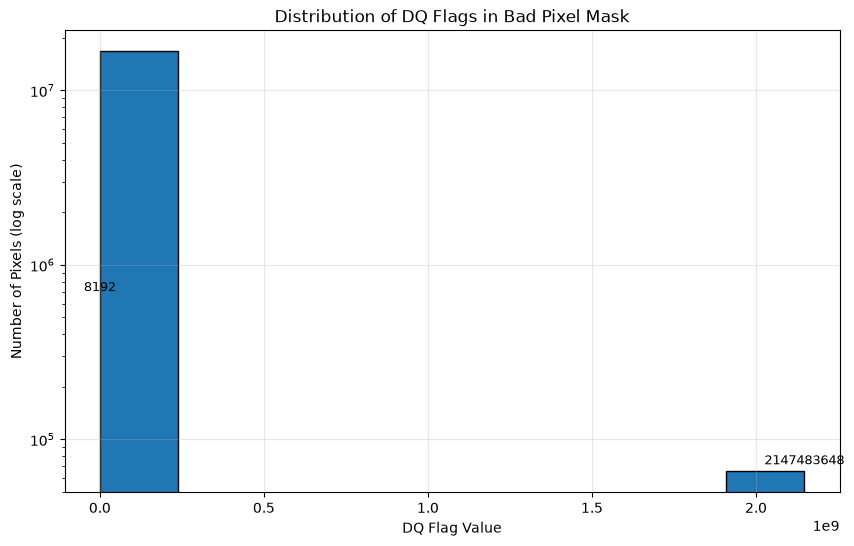
  DQ = 8192:    643,554 pixels ( 3.836%)
  DQ = 9217:      2,641 pixels ( 0.016%)
  DQ = 65536:        630 pixels ( 0.004%)
  DQ = 66561:      2,968 pixels ( 0.018%)
  DQ = 73728:        358 pixels ( 0.002%)
  DQ = 74753:      3,955 pixels ( 0.024%)
  DQ = 2147483648:     65,472 pixels ( 0.390%)
Putting this information in a different way
plt.figure(figsize=(10, 6))
plt.hist(dq.flatten(), bins=len(unique_dq), edgecolor='black', log=True)
plt.xlabel('DQ Flag Value')
plt.ylabel('Number of Pixels (log scale)')
plt.title('Distribution of DQ Flags in Bad Pixel Mask')
plt.grid(True, alpha=0.3)

# Optional: annotate the most common flags
for val in unique_dq:
    if val > 0 and np.sum(dq == val) > total_pixels * 0.001:  # only label significant ones
        plt.text(val, np.sum(dq == val)*1.1, str(val), ha='center', fontsize=9)

plt.show()
Now, let’s plot two versions of the file, one with each bitwise sum of DQ flags on a color map and another flattened version with “good” (DQ = 0; black pixels in the right-hand panel of the plot below) and “bad” (DQ >= 1; white pixels in the right-hand panel of the plot below) flags:
fig, axs = plt.subplots(1, 2, figsize=(14, 14))

# Make a copy of the colormap so we can reset non-finite numbers to black
my_cmap = copy.copy(cm.get_cmap('nipy_spectral'))
my_cmap.set_bad((0, 0, 0))

# Display the mask file with a log normalization using the updated color map
im = axs[0].imshow(mask.dq, origin='lower', norm=colors.LogNorm(vmin=1, vmax=5e5), cmap=my_cmap)
divider = make_axes_locatable(axs[0])
cax = divider.append_axes("right", size="5%", pad=0.05)
axs[0].set_xlabel('Science X (pixels)')
axs[0].set_ylabel('Science Y (pixels)')
axs[0].set_title('Color-Coded DQ Flags')
fig.colorbar(im, cax=cax)

# Display the mask file with boolean good and bad values on a grayscale map
axs[1].imshow(np.bool(mask.dq), origin='lower', cmap='binary_r')
axs[1].set_xlabel('Science X (pixels)')
axs[1].set_ylabel('Science Y (pixels)')
axs[1].set_title('Good vs Bad Flags')

plt.tight_layout();
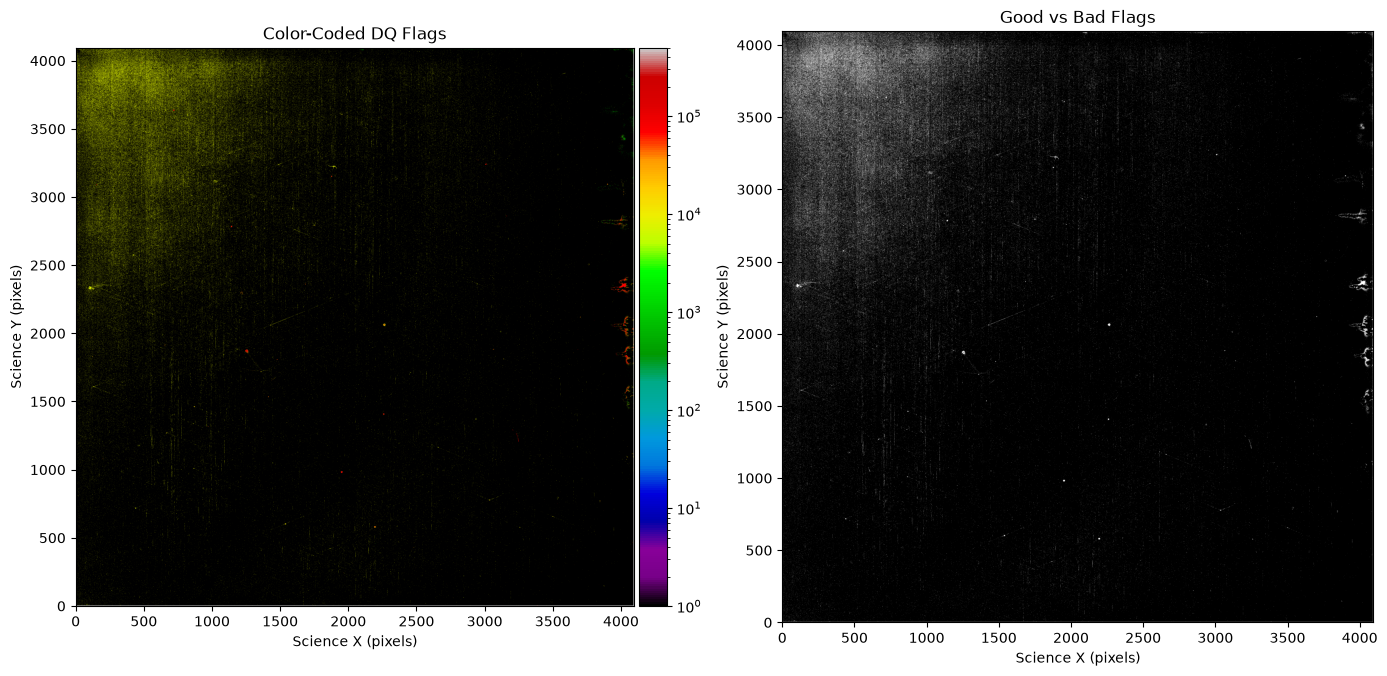
Note that not all DQ flags > 0 are necessarily bad. Many DQ flags are informational about detector effects or note something about the data processing. It is important for you to decide what effects are important for your science case.
About this Notebook#
Author: T. Desjardins. & R. Diaz
Updated On: 2026-07-06
| Top of page |

|

|