
CRDS Reference Files#
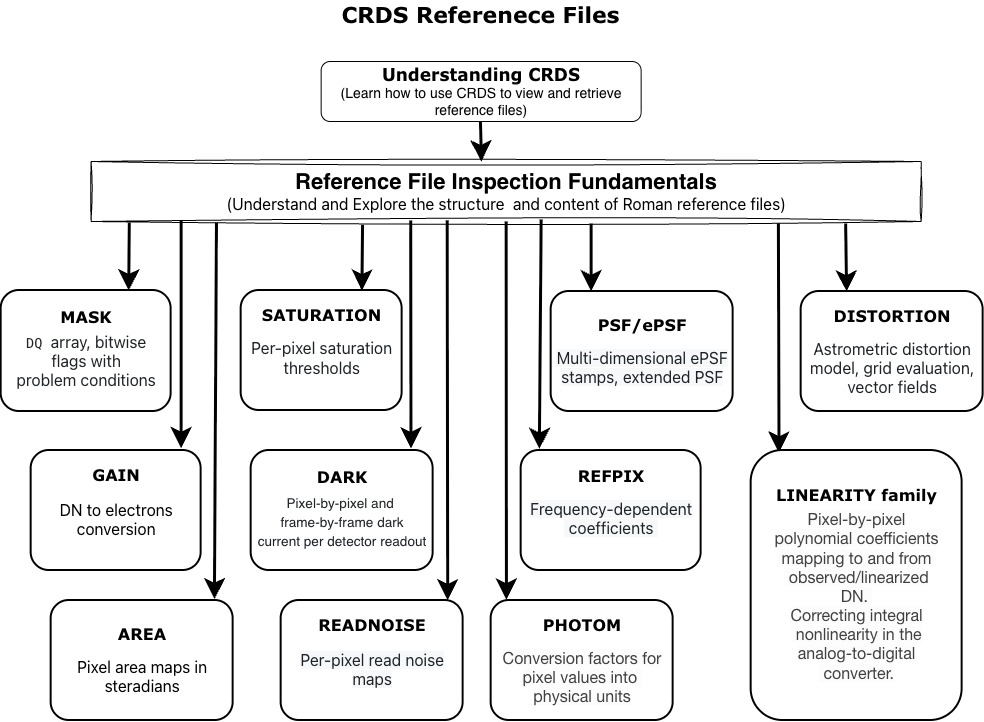
This science workflow guides users through understanding the structure, content, and usage of Calibration Reference Data System (CRDS) reference files for the Roman Wide Field Instrument (WFI).
The notebooks in this workflow are designed as standalone tutorials but can be followed sequentially for a complete introduction to how reference files are retrieved, inspected, and visualized.
Workflow Overview#
General CRDS Introduction#
-
Learn what CRDS is, how reference files are matched and delivered, and how to use
crds.getreferences()andcrds.getrecommendations().
Reference File Inspection Fundamentals#
crds_reference_files.ipynb (first part) + individual reference file notebooks
Understand the common structure of Roman reference files using roman_datamodels and the .info() method.
Individual Reference File Notebooks#
Explore each major reference file type in detail:
Reference File |
Purpose |
Key Concepts Covered |
Notebook |
|---|---|---|---|
MASK (Bad Pixel Mask) |
DQ flags and bad pixel identification |
|
|
DARK |
Dark current correction |
Pixel-by-pixel and frame-by-frame dark current values per detector readout mode |
|
SATURATION |
Saturation thresholds |
Per-pixel thresholds, flag handling |
|
REFPIX |
Reference pixel correction |
Frequency-dependent coefficients ( |
|
DISTORTION |
Astrometric distortion model |
Astropy |
|
PHOTOM |
Photometric calibration |
conversion factors for putting pixel values into physical units |
|
GAIN |
DN to electrons conversion |
Per-pixel gain maps, amplifier structure |
|
READNOISE |
Read noise characterization |
Per-pixel read noise maps |
|
AREA |
Pixel solid angle |
Pixel area maps in steradians |
|
PSF / ePSF |
Empirical point spread function |
Multi-dimensional ePSF stamps, extended PSF |
|
LINEARITY family |
Non-linearity correction |
|
Suggested Learning Path#
Start with the general CRDS Reference Files notebook.
Go through the individual reference file notebooks in roughly this order:
MASK -> DARK -> SATURATION -> FLAT (foundational)
GAIN -> READNOISE -> AREA -> DISTORTION (detector characterization)
LINEARITY family (important for flux accuracy)
PHOTO (photometric calibration)
REFPIX, PSF/ePSF (more specialized)
Return to the general CRDS notebook as needed for context.
How to Use This Workflow#
Work through the notebooks sequentially for a comprehensive understanding.
Use individual notebooks independently when you need to inspect a specific reference file.
All notebooks follow a consistent structure